Git学习
初始化仓库
本地仓库初始化
git init:创建.git子目录,初始化仓库
git add
git commit
克隆仓库
git clone <url> (NewName):克隆远程仓库,()为可选项
Git 基础
文件的状态周期
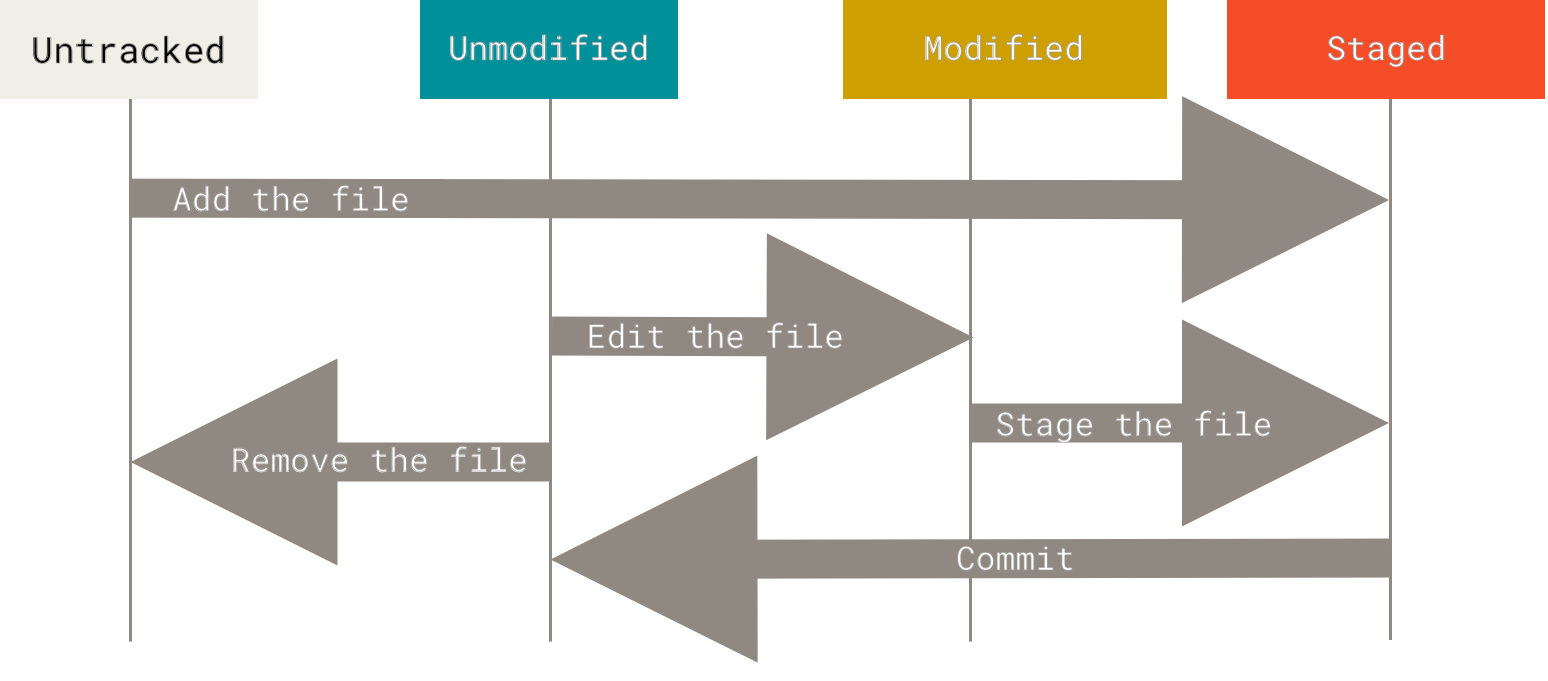
git status:查看文件状态、branch、Untracked files、Changes to be committed......
git add <filename>:对于 Untracked file,添加跟踪;对于Modified file 放入 Staged
.gitignore:配置忽略文件
git diff:Unstaged
git diff --staged
git commit -a -m "message":提交,-a 选项把所有 Tracked files 暂存一并提交
git rm
git mv
提交历史
git log:--patch/-p 选项 以补丁格式输出每次提交引入的差异;--stat 选项 粗略统计;--graph 图形显示
撤销
git commit --amend:代替上一次提交
远程仓库
git remote:列出远程服务器简写,默认origin
git remote add <shortname> <url>:添加远程仓库,shortname为简写,可代替url
git fetch <remote>:拉取内容
git push <remote> <branch>:推送
git remote rename oldname newname:重命名
打标签
git tag
Git 分支
创建、切换、删除
Git 默认分支为master
git branch <name>:创建分支,指向当前提交对象
Head:特殊指针,指向当前所在分支
git checkout <name>:切换分支,Head指向name,分支切换会改变你工作目录中的文件!
git checkout -b <newbranchname>:创建新分支的同时切换过去
git branch -d <name>:删除分支
合并
case1:“ 如果顺着一个分支走下去能够到达另一个分支,那么 Git 在合并两者的时候, 只会简单的将指针向前推进(指针右移),因为这种情况下的合并操作没有需要解决的分歧——这就叫做 “快进(fast-forward)”
case2:“如果开发历史从一个更早的地方开始分叉开来(diverged)。 因为,master 分支所在提交并不是 <name> 分支所在提交的直接祖先,Git 不得不做一些额外的工作。 出现这种情况的时候,Git 会使用两个分支的末端所指的快照以及这两个分支的公共祖先,做一个简单的三方合并。”
如果在两个不同的分支中,对同一个文件的同一个部分进行了不同的修改,此时 Git 做了合并,但是没有自动地创建一个新的合并提交。git status查看 unmerged files
管理
远程分支

origin:远程仓库
origin/master:指向origin的master分支的指针
master:(上图)远程的master分支、(下图)本地的master分支,这两个master不一定同步。
同步、推送、跟踪
git fetch <remote>:同步remote数据、移动origin/master指针到更新之后的位置。
git push <remote> <branch>:推送分支
fetchpush都可以指定分支
git pull:fetch+merge
git pull --rebase:fetch+rebase
变基
git rebase <branch>:从当前(HEAD)变基到 branch
git rebase <branch> <src>:从 src 变基到 branch
区别与 merge 的合并:
git merge <branch>是把branch和HEAD合并